

Steps below to create:
To stop an RDS instance every 7 days using AWS Lambda and Terraform, below are the following concepts followed:
Explanation:
aws_iam_role.rds_stop_lambda_roleandaws_iam_role_policy.rds_stop_lambda_policy: These define the necessary permissions for the Lambda function to interact with RDS and CloudWatch Logs.aws_lambda_function.rds_stop_lambda: This resource defines the Lambda function itself, including its runtime, handler, associated IAM role, and the zipped code. It also passes theRDS_INSTANCE_IDENTIFIERandREGIONas environment variables for the Python script.aws_cloudwatch_event_rule.rds_stop_schedule: This creates a scheduled EventBridge rule using a cron expression.cron(0 0 ? * SUN *)schedules the execution for every Sunday at 00:00 UTC. Adjust this cron expression as needed for your desired 7-day interval and time.aws_cloudwatch_event_target.rds_stop_target: This links the EventBridge rule to the Lambda function, ensuring the function is invoked when the schedule is met.aws_lambda_permission.allow_cloudwatch_to_call_lambda: This grants EventBridge the explicit permission to invoke the Lambda function.- Lambda Function: A Python-based Lambda function that uses the AWS SDK (boto3) to stop the specified RDS instance(s).
- Step 1
- IAM Role for Lambda: An IAM role that grants the Lambda function permissions to stop RDS instances.
- Step 2
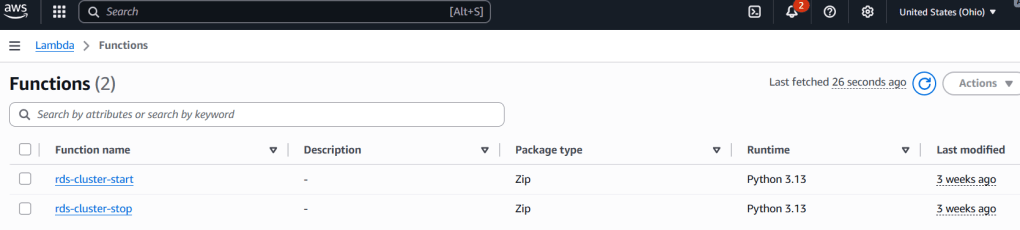
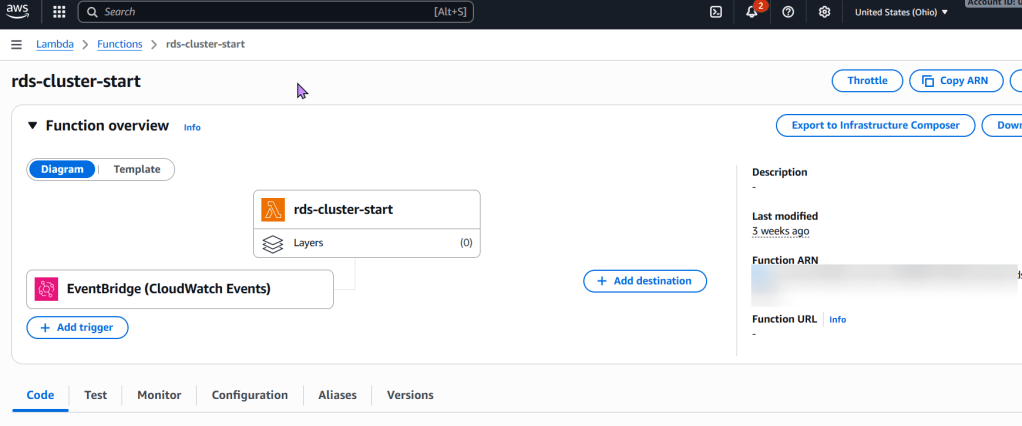
- Lambda Function: A Python-based Lambda function that uses the AWS SDK (boto3) to stop the specified RDS instance(s).
- Step 3
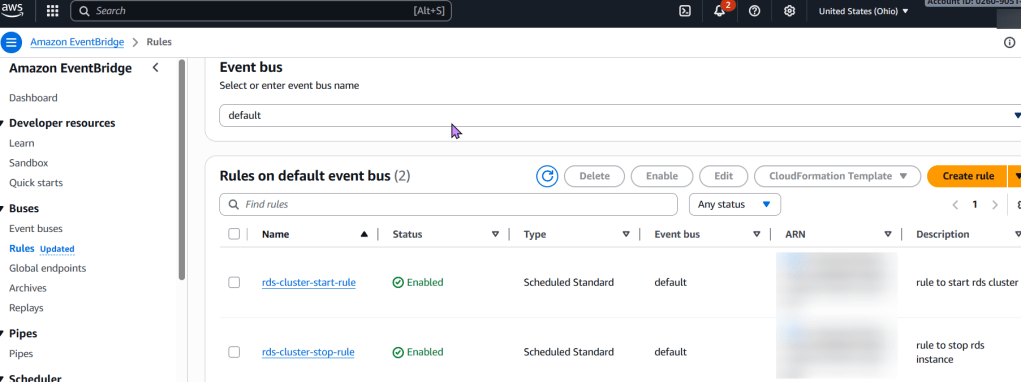
- EventBridge Rule (CloudWatch Event Rule): A scheduled EventBridge rule that triggers the Lambda function every 7 days using a cron expression.
- Step 4
- To deploy:
- Save the Terraform code in
.tffiles and the Python code aslambda_function.py. - Zip the Python file into
lambda_function.zip. - Initialize Terraform:
terraform init - Plan the deployment:
terraform plan- Apply the changes:
terraform apply
- Apply the changes:
- Save the Terraform code in
- To deploy:
- Main.tf
# Define an IAM role for the Lambda function
resource "aws_iam_role" "rds_stop_lambda_role" {
  name = "rds-stop-lambda-role"

  assume_role_policy = jsonencode({
    Version = "2012-10-17",
    Statement = [
      {
        Action = "sts:AssumeRole",
        Effect = "Allow",
        Principal = {
          Service = "lambda.amazonaws.com"
        }
      }
    ]
  })
}

# Attach a policy to the role allowing RDS stop actions and CloudWatch Logs
resource "aws_iam_role_policy" "rds_stop_lambda_policy" {
  name = "rds-stop-lambda-policy"
  role = aws_iam_role.rds_stop_lambda_role.id

  policy = jsonencode({
    Version = "2012-10-17",
    Statement = [
      {
        Effect = "Allow",
        Action = [
          "rds:StopDBInstance",
          "rds:DescribeDBInstances"
        ],
        Resource = "*" # Restrict this to specific RDS instances if needed
      },
      {
        Effect = "Allow",
        Action = [
          "logs:CreateLogGroup",
          "logs:CreateLogStream",
          "logs:PutLogEvents"
        ],
        Resource = "arn:aws:logs:*:*:*"
      }
    ]
  })
}

# Create the Lambda function
resource "aws_lambda_function" "rds_stop_lambda" {
  function_name = "rds-stop-every-7-days"
  handler       = "lambda_function.lambda_handler"
  runtime       = "python3.9"
  role          = aws_iam_role.rds_stop_lambda_role.arn
  timeout       = 60

  # Replace with the path to your zipped Lambda code
  filename         = "lambda_function.zip"
  source_code_hash = filebase64sha256("lambda_function.zip")

  environment {
    variables = {
      RDS_INSTANCE_IDENTIFIER = "my-rds-instance" # Replace with your RDS instance identifier
      REGION                  = "us-east-1"       # Replace with your AWS region
    }
  }
}

# Create an EventBridge (CloudWatch Event) rule to trigger the Lambda
resource "aws_cloudwatch_event_rule" "rds_stop_schedule" {
  name                = "rds-stop-every-7-days-schedule"
  schedule_expression = "cron(0 0 ? * SUN *)" # Every Sunday at 00:00 UTC
}

# Add the Lambda function as a target for the EventBridge rule
resource "aws_cloudwatch_event_target" "rds_stop_target" {
  rule      = aws_cloudwatch_event_rule.rds_stop_schedule.name
  target_id = "rds-stop-lambda-target"
  arn       = aws_lambda_function.rds_stop_lambda.arn
}

# Grant EventBridge permission to invoke the Lambda function
resource "aws_lambda_permission" "allow_cloudwatch_to_call_lambda" {
  statement_id  = "AllowExecutionFromCloudWatch"
  action        = "lambda:InvokeFunction"
  function_name = aws_lambda_function.rds_stop_lambda.function_name
  principal     = "events.amazonaws.com"
  source_arn    = aws_cloudwatch_event_rule.rds_stop_schedule.arn
}lambda_function.py(Python code for the Lambda function):
import boto3
import os

def lambda_handler(event, context):
    rds_instance_identifier = os.environ.get('RDS_INSTANCE_IDENTIFIER')
    region = os.environ.get('REGION')

    if not rds_instance_identifier or not region:
        print("Error: RDS_INSTANCE_IDENTIFIER or REGION environment variables are not set.")
        return {
            'statusCode': 400,
            'body': 'Missing environment variables.'
        }

    rds_client = boto3.client('rds', region_name=region)

    try:
        response = rds_client.stop_db_instance(
            DBInstanceIdentifier=rds_instance_identifier
        )
        print(f"Successfully initiated stop for RDS instance: {rds_instance_identifier}")
        return {
            'statusCode': 200,
            'body': f"Stopping RDS instance: {rds_instance_identifier}"
        }
    except Exception as e:
        print(f"Error stopping RDS instance {rds_instance_identifier}: {e}")
        return {
            'statusCode': 500,
            'body': f"Error stopping RDS instance: {e}"
}- Zipping the Lambda Code:
zip lambda_function.zip lambda_function.py
 Say When..