
Series of blog posts show progress of updating/adding to EKS Cluster, this post covers adding Kubectl-Ai, & Kiro under Ai Operations. See below for past posts:
Kubectl-Ai: AI operations assistant for troubleshooting, explanations, not a security scanner – It can translate intent into Kubernetes operations and use tools like kubectl/bash.
- Convert plain English into commands or YAML manifests like;
- kubectl ai “create a deployment with 3 replicas”
- Flow goes;
- Terminal → ~/.kube/config → EKS cluster → AWS profile → Amazon Bedrock → kubectl-ai
- kubectl-ai recommendation
- → edit say_when_git_ops
- → git commit/push
- → Argo CD reconciles
- Sources:
Abstract/Table of Contents:
- Below is the order of items addressed:
- 3 Steps below
- Config kubectl-ai NOT pushed to get
- 2 options to install locally
- Configure AWS Profile
- Check Available Bedrock Models
- Config kubectl-ai NOT pushed to get
- Important Note: 1st time AWS request-form to utilize AWS Bedrock Anthropic Model
- Helpful Kubectl-ai commands
- Example cost messing around
- 3 Steps below
3 Steps below:
Config kubectl-ai: NOT pushed to git
- https://github.com/GoogleCloudPlatform/kubectl-ai#using-aws-bedrock
- Hit the drop-down for verify your configuration –
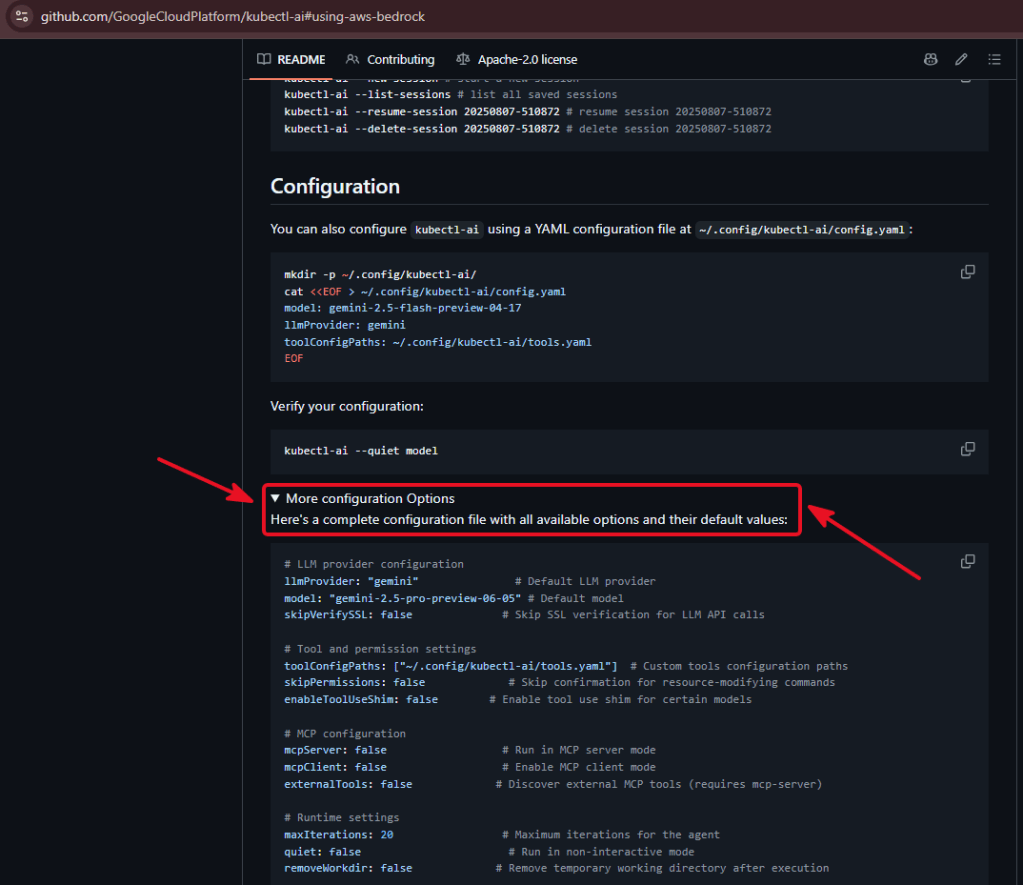
=====================ls -la ~=====================ls -la ~/.config=====================mkdir -p ~/.config/kubectl-ai/config.yaml=====================llmProvider: bedrockmodel: us.anthropic.claude-sonnet-4-20250514-v1:0kubeconfig: ~/.kube/configskipPermissions: falsemaxIterations: 10quiet: falseremoveWorkdir: trueuiType: terminal=====================sed -n '1,200p' ~/.config/kubectl-ai/config.yaml=====================~/.config/├── argocd/├── helm/├── htop/├── k8sGPT/├── k9s/└── kubectl-ai/ └── config.yaml
Option 1 – Install Locally: curl github repo w/sh
=====================curl -sSL \ https://raw.githubusercontent.com/GoogleCloudPlatform/kubectl-ai/main/install.sh |bash=====================kubectl-ai version=====================
Option 2 – Install Locally: Git-Tracked: kubectl-ai/config.example.yaml:
- YAML config file:
- https://github.com/GoogleCloudPlatform/kubectl-ai#configuration
- https://github.com/GoogleCloudPlatform/kubectl-ai#using-aws-bedrock
- As mentioned above – hit the drop-down for verify your configuration
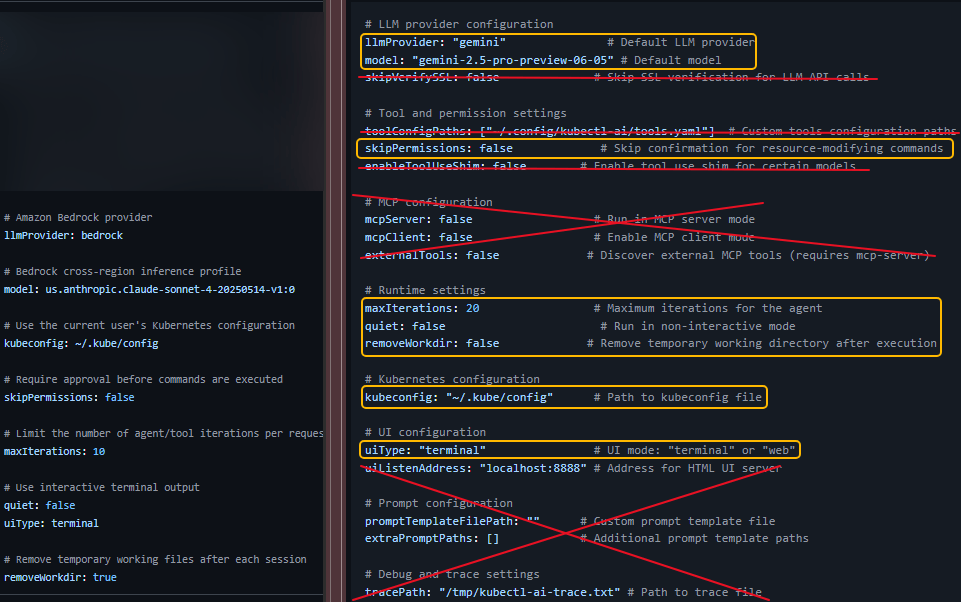
cd ~/x/y/z=====================mkdir -p docs/kubectl-ai=====================nano/vi/IDE docs/kubectl-ai/config.example.yaml=====================# kubectl-ai local configuration example## This file is tracked in Git for documentation.# Copy it to ~/.config/kubectl-ai/config.yaml before using kubectl-ai.## AWS credentials are intentionally not stored here.# kubectl-ai uses the normal AWS SDK credential chain.# Amazon Bedrock providerllmProvider: bedrock# Bedrock cross-region inference profilemodel: us.anthropic.claude-sonnet-4-20250514-v1:0# Use the current user's Kubernetes configurationkubeconfig: ~/.kube/config# Require approval before commands are executedskipPermissions: false# Limit the number of agent/tool iterations per requestmaxIterations: 10# Use interactive terminal outputquiet: falseuiType: terminal# Remove temporary working files after each sessionremoveWorkdir: true=====================sed -n '1,200p' docs/kubectl-ai/config.example.yaml=====================git add docs/kubectl-ai/config.example.yamlgit commit -m "document kubectl-ai Bedrock configuration"git push=====================command -v kubectl-ai=====================kubectl-ai version=====================
- The 8 settings are official Bedrock documentation options/recommendations
Configure AWS Profile
- Ensure IRSA role for bedrock K8sgpt is in the ServiceAccount
=====================export AWS_REGION=us-east-1export AWS_DEFAULT_REGION=us-east-1export AWS_PROFILE=<your-profile>=====================kubectl config current-context=====================kubectl cluster-info=====================kubectl get nodes=====================aws sts get-caller-identity=====================aws configure list=====================aws sts get-caller-identity --profile <your-profile>
Check available Bedrock models:
=====================aws bedrock list-foundation-models \ --region us-east-1 \ --by-provider anthropic \ --query 'modelSummaries[].{Name:modelName,ID:modelId}' \ --output table=====================aws bedrock list-inference-profiles \ --region us-east-1 \ --query 'inferenceProfileSummaries[].{Name:inferenceProfileName,ID:inferenceProfileId,Status:status}' \ --output table=====================kubectl-ai --quiet modelus.anthropic.claude-sonnet-4-20250514-v1:0=====================
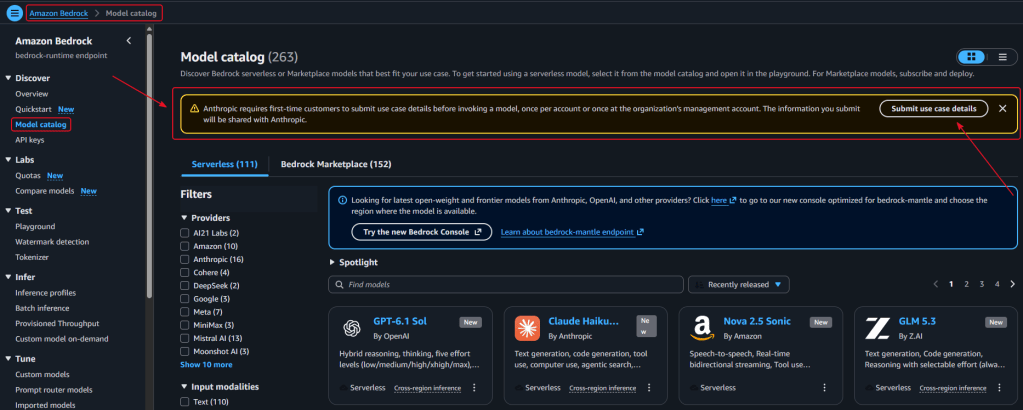
Important Note: First time users will fill out a request-form, wait about 15 minutes.
- Sources:
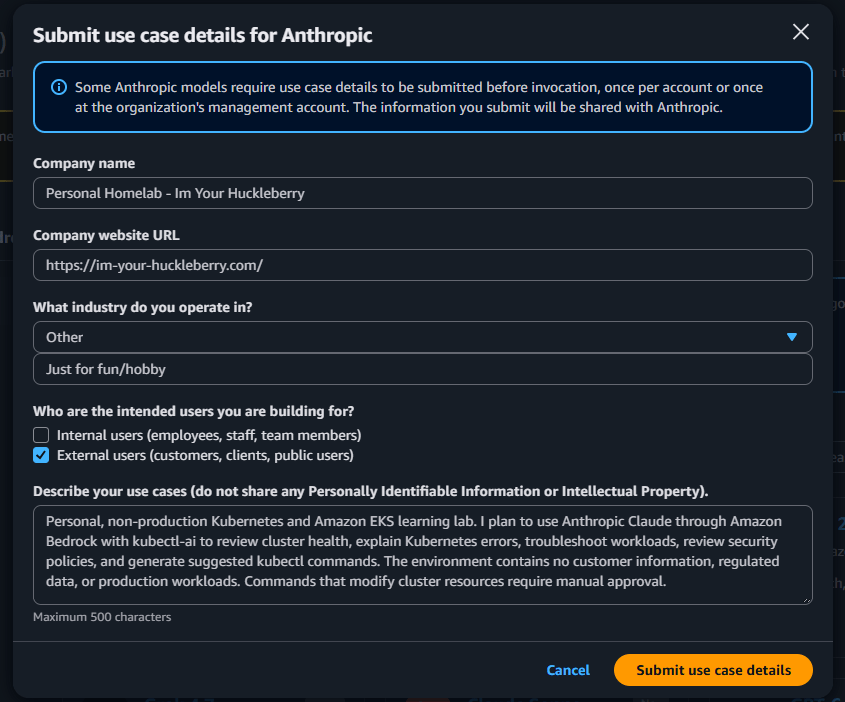
Kubectl-ai Costs:
- For Claude Sonnet 4, the approximate on-demand rate is:
- Input: $3 per 1 million tokens
- Output: $15 per 1 million tokens
| kubectl-ai task | Example usage | Approximate cost |
|---|---|---|
| Simple question | 5K input + 1K output | $0.03 |
| Normal diagnosis | 10K input + 2K output | $0.06 |
| Larger investigation | 25K input + 5K output | $0.15 |
| Very large session | 100K input + 20K output | $0.60 |
Commands while your waiting for submission form to be approved:
=====================- cd ~/x/y/z- mkdir -p ~/.config/kubectl-ai- cp docs/kubectl-ai/config.example.yaml \- ~/.config/kubectl-ai/config.yaml- chmod 600 ~/.config/kubectl-ai/config.yaml=====================sed -n '1,200p' ~/.config/kubectl-ai/config.yaml=====================- command -v kubectl-ai- kubectl-ai version- aws sts get-caller-identity- kubectl cluster-info=====================
15 minutes is up – lets check it
- Should see an email like this

=====================aws bedrock-runtime converse \ --region us-east-1 \ --model-id us.anthropic.claude-sonnet-4-20250514-v1:0 \ --messages '[{"role":"user","content":[{"text":"Reply with exactly: Bedrock works"}]}]' \ --inference-config '{"maxTokens":20}' \ --output json \ > /tmp/bedrock-test.json=====================jq -r '.output.message.content[0].text' \ /tmp/bedrock-test.jsonBedrock works===================== grep -E '^(llmProvider|model):' \ ~/.config/kubectl-ai/config.yamlllmProvider: bedrockmodel: us.anthropic.claude-sonnet-4-20250514-v1:0=====================
Kubectl-ai commands:
- Can increase code iteration to 20 if 10 is not getting you enough
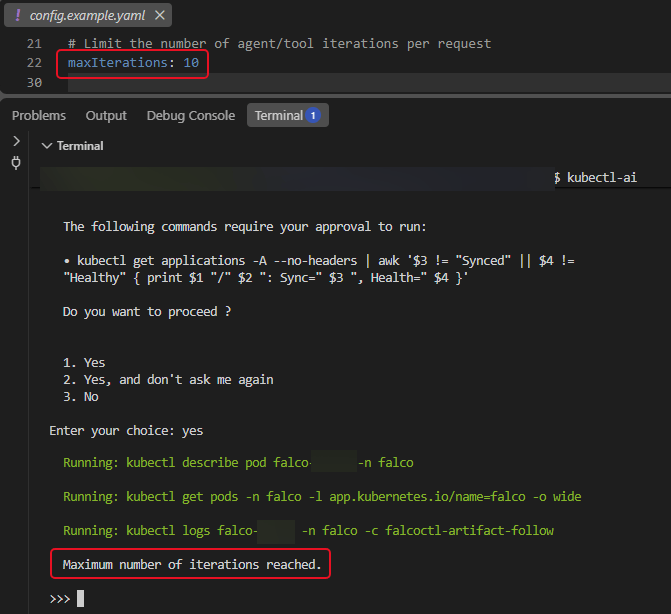
=====================kubectl ai \ "List unhealthy pods across all namespaces and explain the problems. Do not make any changes."=====================kubectl ai \ "Check Argo CD Applications that are not Healthy or Synced. Do not modify anything."=====================kubectl ai \ "Review pending pods and explain the scheduling failures. Do not make changes."=====================kubectl ai \ "Inspect recent warning events across the cluster and summarize the most important problems. Do not change resources."=====================kubectl ai \ "Diagnose the unhealthy Tempo StatefulSet and show the GitOps YAML change you recommend. Do not apply the change." "Review all Argo CD Applications and identify anything that is not Synced or Healthy. Do not modify the cluster."=====================kubectl-ai \ "Show the current Kubernetes context and list unhealthy pods across all namespaces. Explain the problems but do not make any changes." "Review all Argo CD Applications and identify anything that is not Synced or Healthy. Do not modify the cluster."=====================kubectl-ai \ "Review all Argo CD Applications and identify anything that is not Synced or Healthy. Do not modify the cluster."=====================kubectl ai=====================exit=====================
Example cost messing around for about 45 minutes:
| Model | Input cost | Output cost | Total |
|---|---|---|---|
| Claude Sonnet 4.6 | 43,286 × $3/M = $0.130 | 948 × $15/M = $0.014 | $0.14 |
| Legacy Claude Sonnet 4 | 438,571 × $3/M = $1.316 | 6,404 × $15/M = $0.096 | $1.41 |
| Combined | $1.56 |

