

Series of blog posts show progress of updating/adding to EKS Cluster, this post covers adding a few K8 Security Tooling; Popeye & Kube-Bench.
Blog is broken up into:
- Popeye:
- Lightweight cluster “sanity/hygiene” scanner to inspect live cluster & flag misconfigurations
- Kube-Bench:
- CIS Benchmarks
See below for past posts:
Popeye: good lightweight cluster “sanity/hygiene” scanner to inspect live cluster & flag misconfigurations
Steps include the following flow:
- Not using a 3rd party Popeye Helm-Chart when upstream project already provides an in-cluster CronJob model, so this keeps dependency chain simpler.
- Terraform Apply
- → EKS
- → Argo CD
- → applications/popeye.yaml
- → apps/popeye/*
- → Popeye CronJob created automatically
- ** Cluster & all services may take around 10 minutes to fully stand-up, so dont panic **
Sources: https://github.com/derailed/popeye?
- This helps provide an upstream-supported deployment model
applications/popeye.yaml
- Dockerfile image ECR
- https://github.com/derailed/popeye/blob/master/Dockerfile
- infra/ecr-popeye.tf
- infra/outputs.tf
- infra/images/popeye/Dockerfile
- Start w/an read-only ServiceAccount & ClusterRole & follows upstream in-cluster RBAC model
- Obsolete PodSecurityPolicy omitted from K8s documentation.
apps/popeye/rbac.yaml
- General final step of running Popeye as a Cronjob ran 1x / hour
apps/popeye/cronjob.yaml
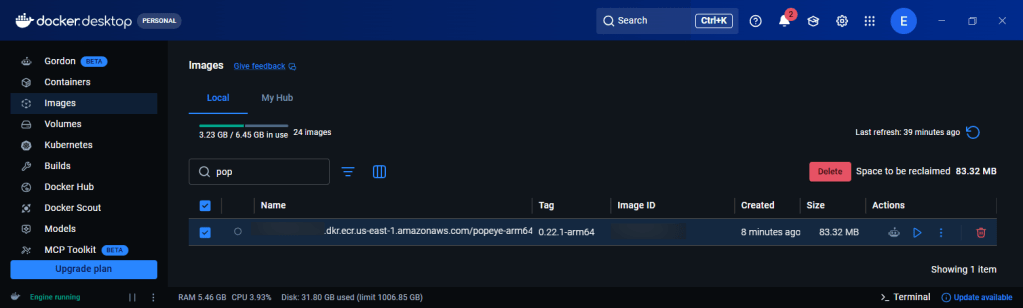
Build & Push the ARM64 image:
- Terraform apply
- Apply complete! Resources: 1 added, 0 changed, 0 destroyed.Outputs:popeye_ecr_repository_url = "xxxxxxxxxxx.dkr.ecr.us-east-1.amazonaws.com/popeye-arm64"
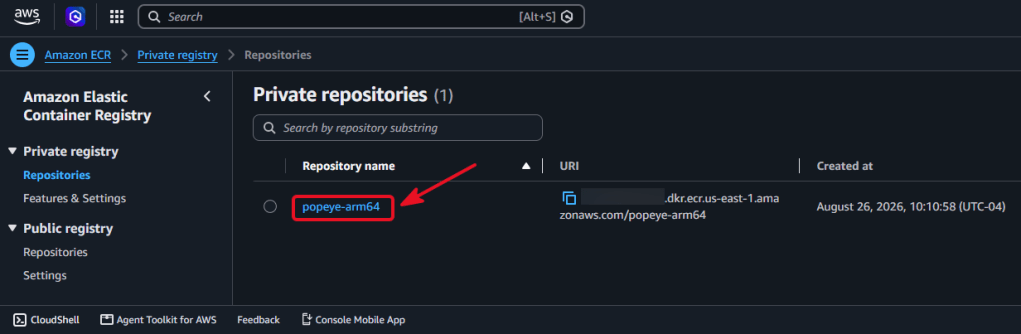
- Set variables
AWS_REGION=us-east-1AWS_ACCOUNT_ID=$(aws sts get-caller-identity --query Account --output text)ECR_REPO="${AWS_ACCOUNT_ID}.dkr.ecr.${AWS_REGION}.amazonaws.com/popeye-arm64"POPEYE_VERSION="0.22.1"
- Authenticate Docker
aws ecr get-login-password --region "$AWS_REGION" \ | docker login \ --username AWS \ --password-stdin \ "${AWS_ACCOUNT_ID}.dkr.ecr.${AWS_REGION}.amazonaws.com"
- Build & Push for ARM64
- Should take less then a minute
docker buildx build \ --platform linux/arm64 \ -t "${ECR_REPO}:${POPEYE_VERSION}-arm64" \ --push \ images/popeye 1.7s
- Describe images
aws ecr describe-images \ --repository-name popeye-arm64 \ --region us-east-1
Pre-Commands:
- kubectl delete job popeye-manual -n popeye --ignore-not-found----------------------------------------------------------------------------- kubectl create job \ --from=cronjob/popeye \ popeye-manual \ -n popeye----------------------------------------------------------------------------- kubectl annotate application popeye -n argocd \ argocd.argoproj.io/refresh=hard \ --overwrite----------------------------------------------------------------------------- kubectl auth can-i \ --as=system:serviceaccount:popeye:popeye \ list endpoints -Ayes----------------------------------------------------------------------------- kubectl auth can-i \ --as=system:serviceaccount:popeye:popeye \ list configmaps -Ayes----------------------------------------------------------------------------
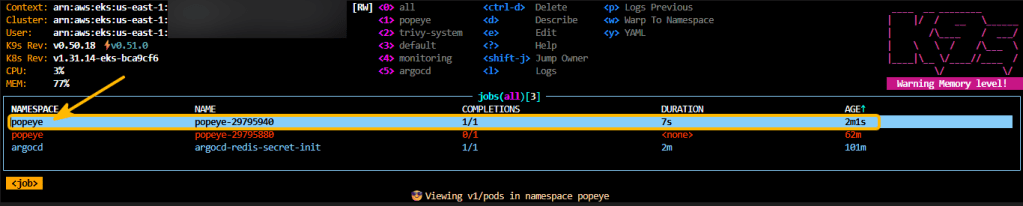
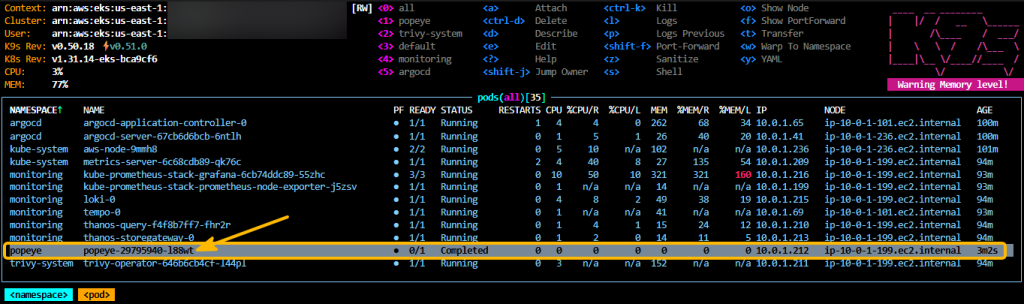
Check w/kubectl or k9s:
- kubectl get application popeye -n argocd- kubectl get cronjob -n popeye- kubectl get jobs -n popeye- kubectl get pods -n popeye- kubectl get jobs -n popeye --sort-by=.metadata.creationTimestamp
NAME SYNC STATUS HEALTH STATUSpopeye Synced HealthyNAME SCHEDULE TIMEZONE SUSPEND ACTIVE LAST SCHEDULE AGEpopeye 0 * * * * <none> False 0 41m 132mNAME STATUS COMPLETIONS DURATION AGEpopeye-29795880 Failed 0/1 101m 101mpopeye-29795940 Complete 1/1 7s 41mNAME READY STATUS RESTARTS AGEpopeye-29795940-l88wt 0/1 Completed 0 41m
Popeye Commands:
- kubectl logs -n popeye job/popeye-manual | grep "message:"message: '[POP-406] K8s version OK' message: '[POP-107] No resource limits defined' message: '[POP-102] No probes defined' message: '[POP-1204] Pod ingress is not secured by a network policy' message: '[POP-302] Pod could be running as root user. Check SecurityContext/Image' message: '[POP-1204] Pod ingress is not secured by a network policy' message: '[POP-1102] Use of target port #3100 for service port TCP:tempo-prom-metrics:3100. message: '[POP-303] Do you mean it? ServiceAccount is automounting APIServer message: '[POP-106] No resources requests/limits defined'----------------------------------------------------------------------------- kubectl logs -n popeye job/popeye-manual \ | grep -E '^ (score|grade):' | head -2 score: 77 grade: C----------------------------------------------------------------------------kubectl logs -n popeye job/popeye-manual \ | grep -o '\[POP-[0-9]\+\]' \ | sort \ | uniq -c \ | sort -nr 48 [POP-1204] 46 [POP-400] 28 [POP-106] 27 [POP-306] 27 [POP-102] 22 [POP-301] 19 [POP-1102] 8 [POP-401] 4 [POP-666] 4 [POP-105] 3 [POP-708] 2 [POP-1300] 1 [POP-406]
Commands to rebuild:
----------------------------------------------------------------------------/infra:terraform fmt -recursiveterraform validateterraform planterraform apply----------------------------------------------------------------------------/infra:- aws eks update-kubeconfig \ --region us-east-1 \ --name say-when-east----------------------------------------------------------------------------/infra:- export COSIGN_IDENTITY="your-email@example.com"- ./scripts/build-secure-popeye.sh----------------------------------------------------------------------------/gitops:- kubectl create job \ --from=cronjob/popeye \ popeye-manual \ -n popeye- kubectl logs -n popeye job/popeye-manual----------------------------------------------------------------------------
Kube-Bench: CIS Benchmarks
- Tested in YAML files that shares CIS Kubernetes Benchmark checks against node/control-plane configuration & checks whether Kubernetes is deployed securely by running the checks documented in the CIS Kubernetes Benchmark.
- Sources:
- https://github.com/aquasecurity/kube-bench/blob/main/job-eks.yaml?
- gitops/applications/kube-bench.yaml
say_when_git_ops/
├── applications/
│ └── kube-bench.yaml
└── apps/
└── kube-bench/
├── serviceaccount.yaml
├── clusterrole.yaml
├── clusterrolebinding.yaml
└── cronjob.yaml
Pre-Command: check docker build arm64 to match EKS architecture, or have to make image like Popeye
- docker buildx imagetools inspect aquasec/kube-bench:v0.15.6Name: docker.io/aquasec/kube-bench:v0.15.6MediaType: application/vnd.oci.image.index.v1+jsonDigest: sha256:861900910eec45b54a97e4a2af81b16fae7203d768f7f8e7de3b7456807870f5 Manifests: Name: docker.io/aquasec/kube-bench:v0.15.6@sha256:0ce0a3207306919f1efedbc1ae7a5032b71386ebd99adbbed48cd4f5525160c6 MediaType: application/vnd.oci.image.manifest.v1+json Platform: linux/arm64----------------------------------------------------------------------------/infra:- terraform apply- kubectl annotate application kube-bench -n argocd \ argocd.argoproj.io/refresh=hard \ --overwrite----------------------------------------------------------------------------/gitops:- kubectl create job \ --from=cronjob/kube-bench \ kube-bench-manual \ -n kube-bench- kubectl get application -n argocdNAME SYNC STATUS HEALTH STATUSbootstrap-root Synced Healthykube-bench Synced Healthykube-prometheus-stack Synced Healthyloki Synced Healthymetrics-server Synced Healthymonitoring-root Synced Healthynetwork-policies Synced Healthypopeye Synced Healthytempo Synced Healthythanos Synced Healthytrivy-operator Synced Healthy
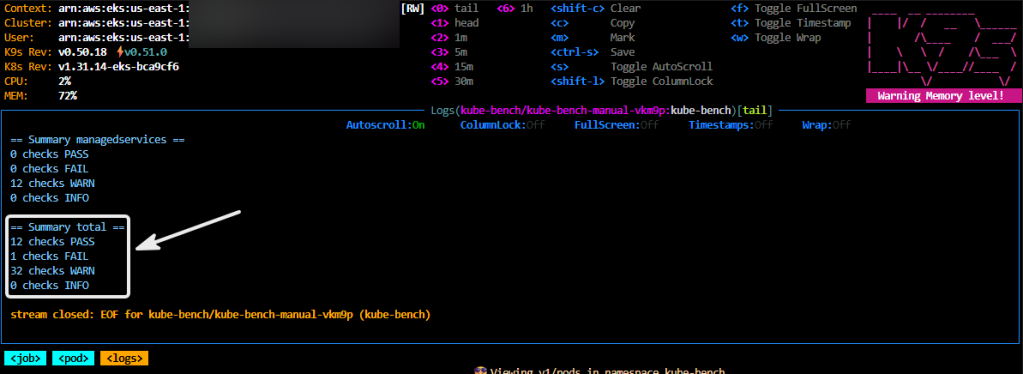
Kube-Bench Er-Thangg’:
- Example of what you will see in the command to look at
- kubectl logs -n kube-bench job/kube-bench-manual----------------------------------------------------------------------------[INFO] 3 Worker Node Security Configuration[INFO] 3.1 Worker Node Configuration Files[PASS] 3.1.1 Ensure that the kubeconfig file permissions are set to 644 or more restrictive (Automated)[PASS] 3.1.2 Ensure that the kubelet kubeconfig file ownership is set to root:root (Automated)[PASS] 3.1.3 Ensure that the kubelet configuration file has permissions set to 644 or more restrictive (Automated)[PASS] 3.1.4 Ensure that the kubelet configuration file ownership is set to root:root (Automated)----------------------------------------------------------------------------== Remediations policies ==4.1.1 Identify all clusterrolebindings to the cluster-admin role. Check if they are used and ifthey need this role or if they could use a role with fewer privileges.Where possible, first bind users to a lower privileged role and then remove theclusterrolebinding to the cluster-admin role :kubectl delete clusterrolebinding [name]----------------------------------------------------------------------------4.5.2 As a best practice we recommend that you scope the binding for privileged pods toservice accounts within a particular namespace, e.g. kube-system, and limiting accessto that namespace. For all other serviceaccounts/namespaces, we recommendimplementing a more restrictive policy such as this:apiVersion: policy/v1beta1kind: PodSecurityPolicymetadata: name: restricted annotations: seccomp.security.alpha.kubernetes.io/allowedProfileNames: 'docker/default,runtime/default' apparmor.security.beta.kubernetes.io/allowedProfileNames: 'runtime/default' seccomp.security.alpha.kubernetes.io/defaultProfileName: 'runtime/default' apparmor.security.beta.kubernetes.io/defaultProfileName: 'runtime/default'----------------------------------------------------------------------------5.1.4 To minimize AWS ECR container registries to only those approved, you can follow these steps:1. Define your approval criteria: Determine the criteria that containers must meet to be considered approved. This can include factors such as security, compliance, compatibility, and other requirements.2. Identify all existing ECR registries: Identify all ECR registries that are currently being used in your organization.3. Evaluate ECR registries against approval criteria: Evaluate each ECR registry against your approval criteria to determine whether it should be approved or not. This can be done by reviewing the registry settings and configuration, as well as conducting security assessments and vulnerability scans.
Just the Total Summary:
- kubectl logs -n kube-bench job/kube-bench-manual \ | grep -A4 "Summary total"== Summary total ==12 checks PASS1 checks FAIL32 checks WARN0 checks INFO
Anything Failed:
- kubectl logs -n kube-bench job/kube-bench-manual \ | grep '^\[FAIL\]'[FAIL] 3.2.7 Ensure that the --eventRecordQPS argument is set to 0 or a level which ensures appropriate event capture (Automated)----------------------------------------------------------------------------- kubectl logs -n kube-bench job/kube-bench-manual \ | grep -A3 '3.2.7'[FAIL] 3.2.7 Ensure that the --eventRecordQPS argument is set to 0 or a level which ensures appropriate event capture (Automated)[PASS] 3.2.9 Ensure that the RotateKubeletServerCertificate argument is set to true (Automated)--3.2.7 If using a Kubelet config file, edit the file to set eventRecordQPS: to an appropriatelevel.If using command line arguments, edit the kubelet service file/etc/systemd/system/kubelet.service.d/10-kubeadm.conf on each worker node
Just the Pass/Warn/Failed Ones:
- kubectl logs -n kube-bench job/kube-bench-manual \ | grep -E '^\[(PASS|FAIL|WARN)\]'[PASS] 3.1.1 Ensure that the kubeconfig file permissions are set to 644 or more restrictive (Automated)[PASS] 3.2.6 Ensure that the --make-iptables-util-chains argument is set to true (Automated)[FAIL] 3.2.7 Ensure that the --eventRecordQPS argument is set to 0 or a level which ensures appropriate event capture (Automated)[PASS] 3.2.8 Ensure that the --rotate-certificates argument is not present or is set to true (Automated)[PASS] 3.2.9 Ensure that the RotateKubeletServerCertificate argument is set to true (Automated)[WARN] 4.1.1 Ensure that the cluster-admin role is only used where required (Automated)[WARN] 4.1.2 Minimize access to secrets (Automated)[WARN] 4.1.3 Minimize wildcard use in Roles and ClusterRoles (Automated)


