

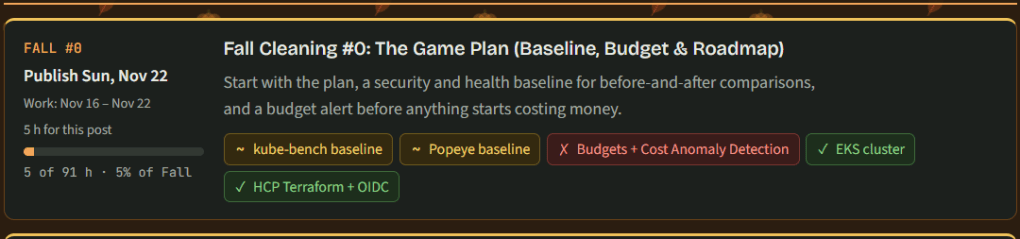
Theme & Goal
- Series of blog posts showing progress of creating an app on top of my EKS Cluster
- Goal:
- Assign 10 chores by email
- Take photos in
- Merge the infra and GitOps cleanup patches
- Move the cluster from Kubernetes 1.31 to 1.35
- Get a clean baseline.
- Share what was learned & anything that that broke along the way.
Surprises & Troubleshooting
- CI failure
- The patch upgraded the optional west cluster’s EKS module from v19 to v20. v19 needed the
hashicorp/kubernetesprovider and v20 doesn’t, so the providers Terraform needs changed. - CI uses a read-only lock file, so it refused the change
- The patch upgraded the optional west cluster’s EKS module from v19 to v20. v19 needed the
======terraform init -backend=false # rewrites .terraform.lock.hcl locally, no backend or AWS calls======git diff .terraform.lock.hcl # only the hashicorp/kubernetes block removed (-21 lines)======git add .terraform.lock.hcl && git commit && git push======
- TFLink Failure
- 403 API rate limit exceeded & TFLint downloads its plugins from GitHub’s API without logging in, and shared CI runners hit the anonymous rate limit.
- name: Initialize TFLint plugins run: tflint --init env: GITHUB_TOKEN: ${{ github.token }}
- Orphaned EBS volumes
- Found listed 33 unattached volumes, but not a big deal from a data POV cuz the data was safe to lose:
- Prometheus held only 24 hours of local data
- Thanos store gateway is a cache over S3.
- There were 13 × 2 GB Prometheus volumes and 20 × 10 GB Thanos store gateway volumes, going back to Aug 14.
- The budget alert exists to catch exactly this kind of slow leak.
- Prometheus and the Thanos store gateway each ask Kubernetes for a disk, and the EBS CSI driver creates an EBS volume for each request.
terraform destroydeleted the cluster without first deleting those disk requests, so EBS never cleaned up their volumes.- Every rebuild left another set behind.
- Delete the apps that own disks before
terraform destroy, and make “no available volumes” part of every teardown check.- 242 GB of gp3 at about $0.08/GB-month is roughly $19/month, about $50 wasted over three months of rebuilds.
- Found listed 33 unattached volumes, but not a big deal from a data POV cuz the data was safe to lose:
======aws eks list-clusters --region us-east-1======aws ec2 describe-volumes --region us-east-1 --filters Name=status,Values=available --query "Volumes[].VolumeId"======
Part A: cluster off (no AWS costs)
======mkdir $HOME\Documents\cluster-app\fall-00======mkdir $HOME\Documents\cluster-app\photos\fall======cd $HOME\Documents\cluster-app======
Take Fall Photos
- Take two photos per chore, one pass and one fail.
- Name them like
01-rake-leaves-pass.jpgand save them inphotos\fall\. - Never put these in a repo, because they can contain your home’s location.
| # | Chore | Pass photo | Fail photo |
|---|---|---|---|
| 01 | Rake leaves | Rake in a leaf pile | Basketball |
| 02 | Bag leaves | Full leaf bags | Empty driveway |
| 03 | Trim trees and bushes | Shears and cut branches | Coffee mug |
| 04 | Put away hoses | Coiled hose in the shed | Bike |
| 05 | Take down the gazebo | Folded gazebo | TV |
| 06 | Store deck furniture | Stacked, covered chairs | Dog |
| 07 | Cover the grill | Covered grill | Car |
| 08 | Cover the AC unit | Covered AC unit | Front door |
| 09 | Clear flower beds | Cleared bed and trowel | Shoes |
| 10 | Last mow | Mower on short grass | Football |
Set the Budget Alert
- AWS Console
- Budgets → Create budget → Use a template → Monthly cost budget.
- Name it
say-when-lab, set the amount to40, enter your email, and create it.
- Name it
- Open the Budget
- Edit → Alerts. Set Actual 50%, Actual 80% and Forecasted 100%.
- Take a screenshot & save it in
fall-00\.
- Budgets → Create budget → Use a template → Monthly cost budget.
Part B: Turn Cluster on & Check your HCP Terraform Workspace
- Edit variables for version, AZs, & subnets.
Apply Infra Patch
- You should see 3 new commits.
======git checkout main======git pull======git checkout -b fix/readme-and-cleanup======git am $HOME\Downloads\say_when_infra.patch======git log --oneline -4======git push -u origin fix/readme-and-cleanup======
Merge & Apply
- Can either do in CLI or UI for Github & HCP connector
======git checkout main======git pull======terraform login======terraform init======terraform apply======
Apply Gitops Patch
- Open the PR, merge it, & ArgoCD applies it.
======git checkout main======git pull======git checkout -b fix/readme-and-cleanup======git am $HOME\Downloads\say_when_git_ops.patch======git push -u origin fix/readme-and-cleanup======
Check Cluster & Edit Waves
- Use CLI or K9s
======aws eks update-kubeconfig --region us-east-1 --name say-when-east======aws eks describe-cluster --name say-when-east --query cluster.version======kubectl get nodes======kubectl get applications -n argocd -w======
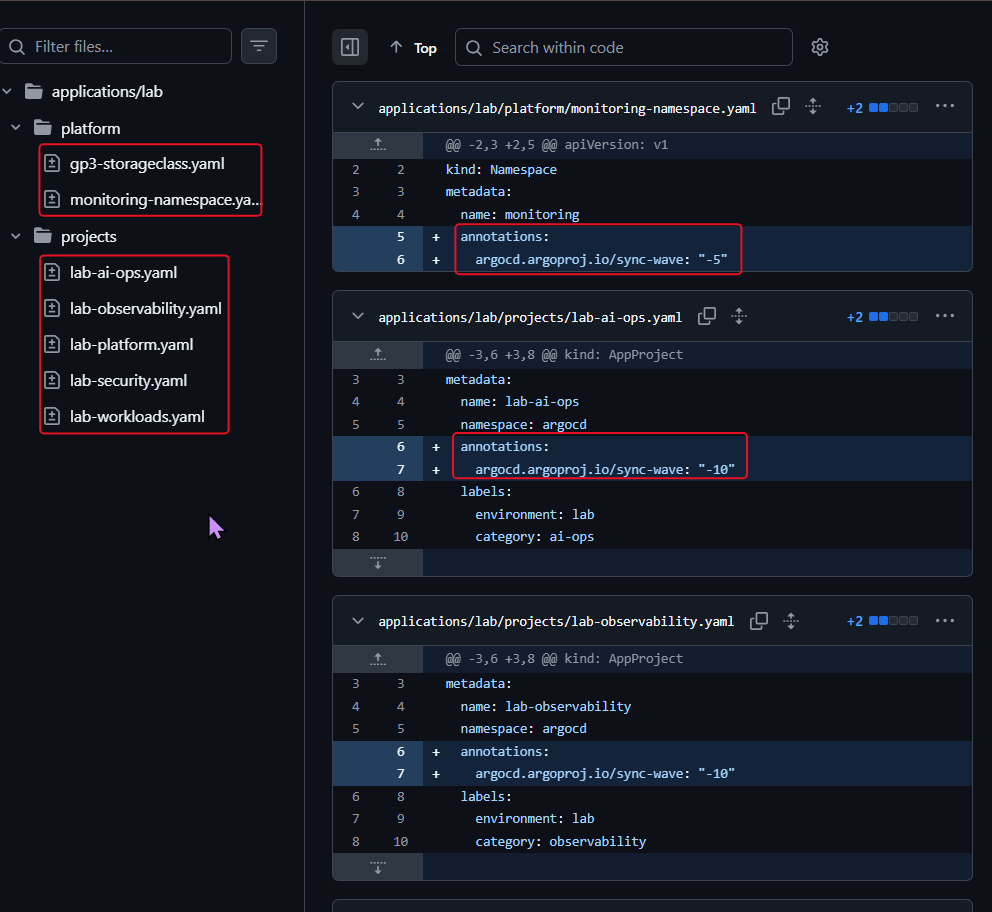
- Files changed: 7 files, 2 lines added to each, nothing removed
- The 5 AppProjects in
applications/lab/projects/:lab-ai-ops.yamllab-observability.yamllab-platform.yamllab-security.yamllab-workloads.yaml
- The 5 AppProjects in
- This makes the projects the very first thing Argo CD creates, before any app that belongs to them. It prevents the deadlock you just hit.
- The 2 cluster-foundation files in
applications/lab/platform/:gp3-storageclass.yamlmonitoring-namespace.yaml
- The 2 cluster-foundation files in
metadata: name: lab-platform namespace: argocd annotations: # ← added argocd.argoproj.io/sync-wave: "-10" # ← added labels: ...
- This makes the
monitoringnamespace and thegp3storage class exist right after the projects and before any app that needs them, like Prometheus and its disks.
metadata: name: monitoring annotations: # ← added argocd.argoproj.io/sync-wave: "-5" # ← added
Quick fix: status.terminatingReplicas: field not declared in schema
- Problem
- The repo server keeps crashing (the “EOF” errors). Kubernetes 1.35 added a new field to Deployment status, and Argo CD (chart 7.1.0) is too old to know about it, so its diff engine fails on any app with a Deployment.
- Example: argo-rollouts, envoy-gateway, k8sgpt-operator, karpenter.
- The repo server keeps crashing (the “EOF” errors). Kubernetes 1.35 added a new field to Deployment status, and Argo CD (chart 7.1.0) is too old to know about it, so its diff engine fails on any app with a Deployment.
- Fix:
- Raise argocd repo server memory to 1gi cuz was OOMKilled for
- Memory limit goes from 384Mi to 1Gi
- Rendering ~30 charts on a fresh cluster runs it out of memory, so it restarts, and every chart it was working on fails.
- CPU goes from 300m to 1 core
- Helps render finishes faster instead of being throttled
- Memory limit goes from 384Mi to 1Gi
- That’s blocking the monitoring stack (Prometheus, Loki, Tempo, Thanos) from being installed at all, which you need today.
- Raise argocd repo server memory to 1gi cuz was OOMKilled for
The repo server keeps crashing (the “EOF” errors). It renders every Helm chart, and its memory limit is only 384Mi. Rendering ~30 charts on a fresh cluster runs it out of memory, so it restarts, and every chart it was working on fails. That’s blocking the monitoring stack (Prometheus, Loki, Tempo, Thanos) from being installed at all, which you need today.
====== resources: requests: cpu: 50m memory: 160Mi memory: 256Mi limits: cpu: 300m memory: 384Mi cpu: "1" memory: 1Gi======kubectl -n argocd rollout status deployment argocd-repo-serverkubectl -n argocd get deploy argocd-repo-server -o jsonpath='{.spec.template.spec.containers[0].resources}{"\n"}'kubectl -n argocd get applications -o name | xargs -I{} kubectl -n argocd annotate {} argocd.argoproj.io/refresh=hard --overwrite======kubectl -n argocd get pods # repo-server restarts stay at 0kubectl get applications -n argocdkubectl get pods -n monitoring
Create Grafana Secret
======kubectl -n monitoring get secrets | grep -i grafanakube-prometheus-stack-grafana Opaque 3 83m======kubectl -n monitoring get secret kube-prometheus-stack-grafana -o jsonpath='{.data.admin-password}' | base64 -d; echo======
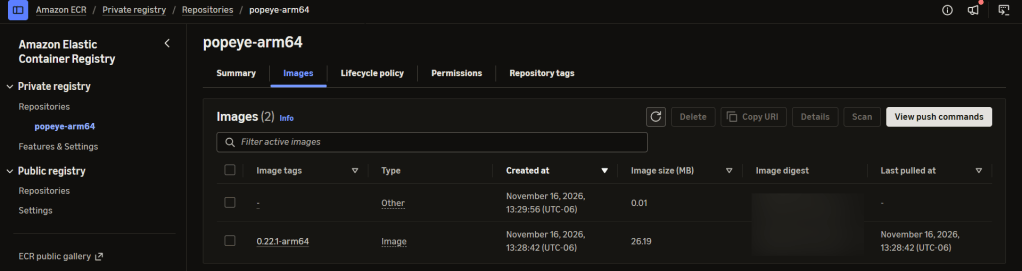
Rebuild the Popeye image
- If Docker buildx, Syft or Cosign is missing, skip this step and use the fallback at the end of h.
======cd /mnt/c/Users/<you>/Documents/say_when_infra======./scripts/build-secure-popeye.sh====== head -30 "$F/popeye-baseline.txt"popeye: report_time: "2026-11-16T19:37:30Z" score: 80 grade: B sections: - linter: cluster gvr: cluster tally: ok: 1 info: 0 warning: 0 error: 0 score: 100 issues: Version: - group: __root__ gvr: cluster level: 0 message: '[POP-406] K8s version OK' - linter: clusterroles gvr: rbac.authorization.k8s.io/v1/clusterroles tally: ok: 138 info: 2 warning: 0 error: 0 score: 100 issues: external-secrets-servicebindings: - group: __root__======grep -m3 -iE '^\s*(score|grade)' "$F/popeye-baseline.txt" score: 80 grade: B score: 100======grep -c 'POP-' "$F/popeye-baseline.txt"586====== grep -oE 'POP-[0-9]+' "$F/popeye-baseline.txt" | sort | uniq -c | sort -rn | head -8 118 POP-1204 59 POP-400 48 POP-106 46 POP-206 42 POP-306 36 POP-102 33 POP-301 32 POP-1109======
Run & Save the Baselines
- Write down the PASS / FAIL / WARN totals and the Popeye score, which is near the end of
popeye-baseline.txt.
======cd $HOME\Documents\cluster-app\fall-00======kubectl create job kube-bench-baseline --from=cronjob/kube-bench -n kube-bench======kubectl create job popeye-baseline --from=cronjob/popeye -n popeye======kubectl wait --for=condition=complete job/kube-bench-baseline -n kube-bench --timeout=10m======kubectl wait --for=condition=complete job/popeye-baseline -n popeye --timeout=10m======kubectl logs job/kube-bench-baseline -n kube-bench | Out-File -Encoding utf8 kube-bench-baseline.txt======kubectl logs job/popeye-baseline -n popeye | Out-File -Encoding utf8 popeye-baseline.txt======grep -m3 -iE '^\s*(score|grade)' "$F/popeye-baseline.txt"grep -c 'POP-' "$F/popeye-baseline.txt"grep -oE 'POP-[0-9]+' "$F/popeye-baseline.txt" | sort | uniq -c | sort -rn | head -8 score: 80 grade: B score: 100586 118 POP-1204 59 POP-400 48 POP-106 46 POP-206 42 POP-306 36 POP-102 33 POP-301 32 POP-1109======
SCREEEEEEEEEEEEENSHOTZZZZZ for Proof
- ArgoCD
- Open http://localhost:8080 and log in as
adminwith the printed password.
- Open http://localhost:8080 and log in as
======ubectl get applications -n argocdNAME SYNC STATUS HEALTH STATUSargo-rollouts Synced Healthybootstrap-root Synced Healthyenvoy-gateway Synced Healthyenvoy-gateway-config Synced Healthyexternal-secrets Synced Healthyexternal-secrets-config Synced Healthyfalco Synced Healthygateway-demo Synced Healthyk8sgpt Synced Healthyk8sgpt-operator Synced Healthykarpenter Synced Healthykarpenter-config Synced Healthykarpenter-crd Synced Healthykube-bench Synced Healthykube-prometheus-stack Synced Healthykyverno Synced Healthykyverno-policies Synced Healthyloki Synced Healthymetrics-server Synced Healthymonitoring-root Synced Healthynetwork-policies Synced Healthypopeye Synced Healthyrollouts-bluegreen Synced Healthyrollouts-demo Synced Healthysecret-demo Synced Healthytempo Synced Healthythanos Synced Healthytrivy-operator Synced Healthy======kubectl get secret argocd-initial-admin-secret -n argocd -o jsonpath="{.data.password}" | base64 -d======kubectl -n argocd port-forward svc/argocd-server 8080:80======
- Grafana
- Open http://localhost:3000 and log in as
adminwith your password from earlier
- Open http://localhost:3000 and log in as
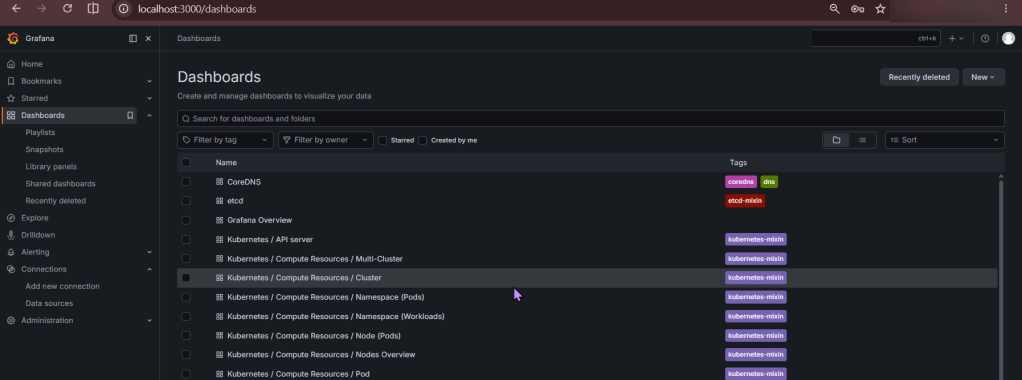
======kubectl -n monitoring port-forward svc/kube-prometheus-stack-grafana 3000:80======kubectl get nodes======
- Save everything in
fall-00\.
Part C: Turn down for what? The Cluster….
- Either in CLI or HCP Terraform (Settings → Destruction and Deletion → Queue destroy plan),
======cd $HOME\Documents\say_when_infra======terraform apply -destroy======
DESTROYYYYYYYYYYYYYYYYYYYYY
- Use whatever commands you prefer, these below can be used as a starter
- If the destroy gets stuck on the Thanos S3 bucket, empty the bucket in the S3 console and run the destroy again.
======# Check 1: no EKS cluster. Should print "clusters": []aws eks list-clusters --region us-east-1======# Check 2: no Karpenter nodes left running. Should print []aws ec2 describe-instances --region us-east-1 \ --filters Name=tag-key,Values=karpenter.sh/nodepool Name=instance-state-name,Values=running,pending \ --query "Reservations[].Instances[].InstanceId"======# Check 3: delete leftover monitoring disks...for v in $(aws ec2 describe-volumes --region us-east-1 --filters Name=status,Values=available Name=tag:kubernetes.io/created-for/pvc/namespace,Values=monitoring --query "Volumes[].VolumeId" --output text); do echo "Deleting $v"; aws ec2 delete-volume --region us-east-1 --volume-id "$v"done======# ...then confirm no loose disks remain. Should print []aws ec2 describe-volumes --region us-east-1 --filters Name=status,Values=available --query "Volumes[].VolumeId"======


