
Series of blog posts show progress of updating/adding to EKS Cluster, this post covers adding Argo Rollouts.
Argo Rollouts:
- Then build progressive delivery
- Install Argo Rollouts through Argo CD.
- Convert the Gateway demo
Deploymentinto aRollout. - Demonstrate blue/green deployment.
- Add canary releases.
- Connect Rollouts to Gateway API.
- Add Prometheus analysis.
- Deploy an intentionally unhealthy version.
- Demonstrate automated rollback.
Phase 2: Test canary promotion and rollback.
- The folder structure you will see is for your deployment
- applications/lab/workloads/rollouts-demo.yaml
- apps/rollouts-demo/
- rollout.yaml
- service-active.yaml
- service-preview.yaml
- Were going to create the canary workload manifests & connect them to ArgoCD w/1 rollout & 1 service – this will help w/the next phase for blue/green deployments…but that is “To Be Continued..”
100% | stable |
20% | canary - pause for review |
50% | canary - pause for review |
100% | new version |
Create Canary Workloads Manifests:
apps/rollouts-demo/service.yaml
apps/rollouts-demo/rollout.yaml
- Sources:
- This is approximate Pod-based traffic distribution—not exact request-level weighting. Exact traffic percentages require integration with a traffic router such as:
- Gateway API
- Istio
- Ingress controller.
| Weight | New version | Stable version |
|---|---|---|
| 20% | 1 Pod | 4 Pods |
| 40% | 2 Pods | 3 Pods |
| 60% | 3 Pods | 2 Pods |
| 80% | 4 Pods | 1 Pod |
| Complete | 5 Pods | 0 Pods |
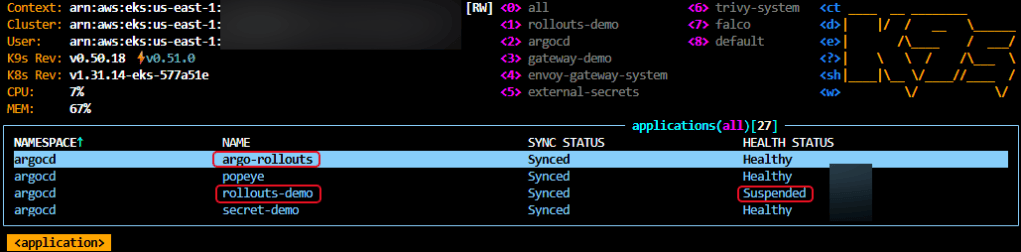
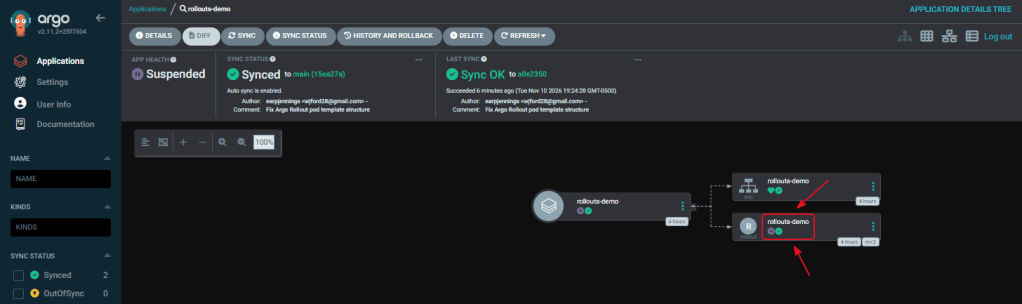
- Note the pause/suspended cuz need manual approval due to canary stage
========================================strategy: canary: maxSurge: 1 maxUnavailable: 0 steps: # Run one new Pod alongside four stable Pods. - setWeight: 20 # Wait for manual approval. - pause: {}========================================
Create Canary Workloads Manifests:
- The initial deployment should go directly to five
bluePods. Canary steps do not run on the first deployment because there is no previous stable version to compare against. - Once it is
Synced/Healthy, the next phase changes the image frombluetoyellow, pauses at 20%, and demonstrates manual promotion or rollback.
applications/lab/projects/lab-workloads.yaml
- Update under the yaml only 2 new areas – as seen below
========================================spec: destinations: - namespace: rollouts-demo server: https://kubernetes.default.svc namespaceResourceWhitelist: - group: argoproj.io kind: Rollout========================================
applications/lab/workloads/rollouts-demo.yaml
- Sources:
Phase 3: Trigger the Canary
- Start with the blue-to-yellow canary—this gives you the clearest visual and blog demonstration of Argo Rollouts working. Below you will
- Complete this real canary deployment.
- Test manual rollback from a bad release.
- Add automated analysis and rollback.
- Build a separate blue/green example.
apps/rollouts-demo/rollout.yaml
- Update the image to yellow
====================================== spec: securityContext: runAsNonRoot: true containers: - name: rollouts-demo image: argoproj/rollouts-demo:blue imagePullPolicy: IfNotPresent======================================spec: replicas: 5 revisionHistoryLimit: 3======================================strategy: canary: maxSurge: 1 maxUnavailable: 0 steps: # Run one new Pod alongside four stable Pods. - setWeight: 20 # Wait for manual approval. - pause: {}======================================
Watch the Rollout:
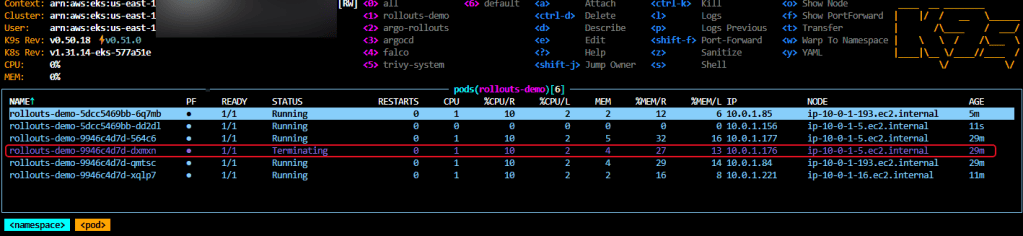
- It SHOULD stop at the manual 20% pause, w/5 new pods 20% represent 1 new yellow pod. So instead of deleting all 5 blue pods, Argo Rollouts created a new ReplicaSet containing the yellow version.
- This limits the impact of a defective release.
| Weight | Approximate pod distribution | Pause |
|---|---|---|
| 40% yellow | 3 blue / 2 yellow | 10 seconds |
| 60% yellow | 2 blue / 3 yellow | 10 seconds |
| 80% yellow | 1 blue / 4 yellow | 10 seconds |
| 100% yellow | 0 blue / 5 yellow | Complete |
Below are examples of K9s & CLI:
======================================kubectl get pods \ -n rollouts-demo \ -L rollouts-pod-template-hash \ --watch======================================kubectl get application rollouts-demo \ -n argocd \ -o custom-columns='NAME:.metadata.name,SYNC:.status.sync.status,HEALTH:.status.health.status'======================================

Approve:
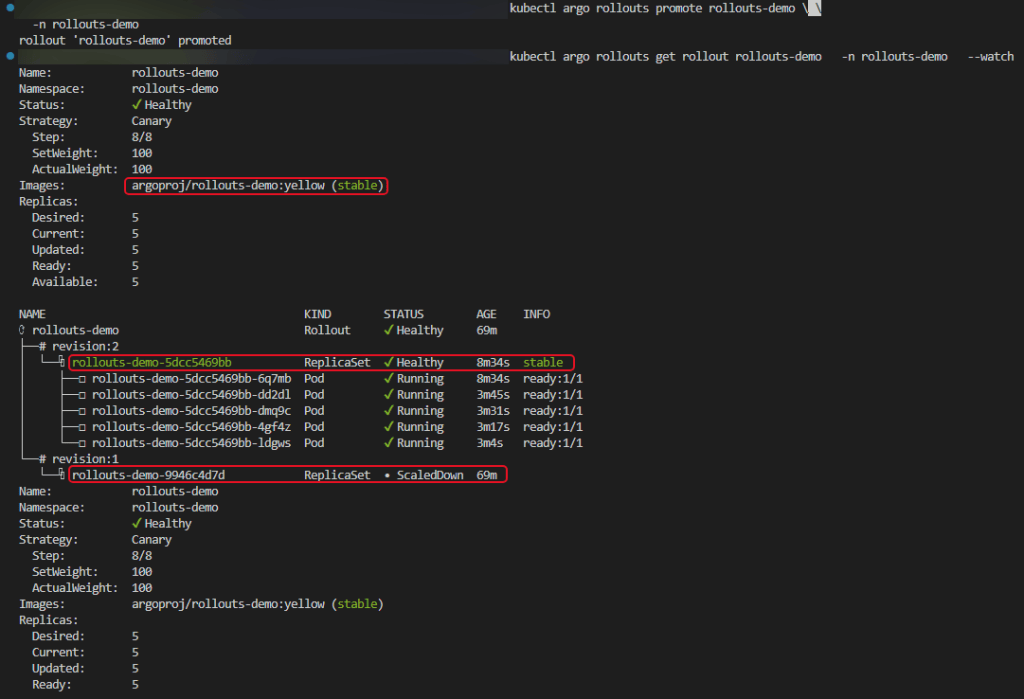
- Confirm yellow canary works
======================================kubectl argo rollouts promote rollouts-demo \ -n rollouts-demo======================================kubectl argo rollouts get rollout rollouts-demo \ -n rollouts-demo \ --watch======================================
Visually Test the Traffic:
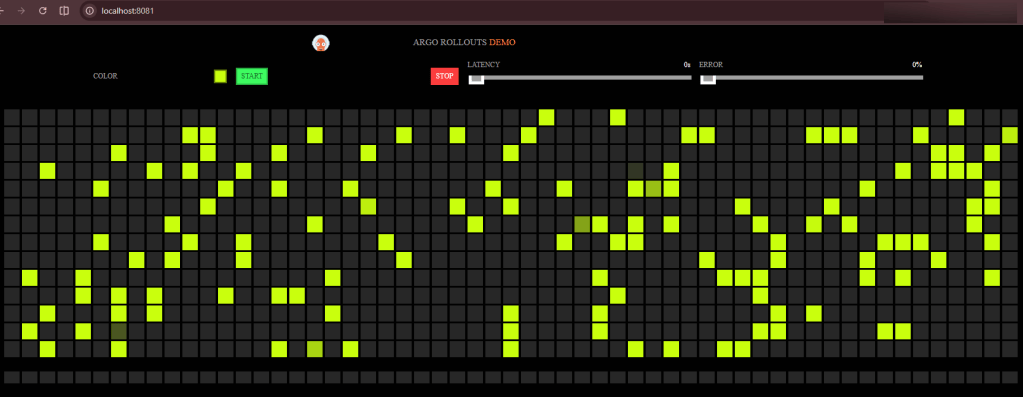
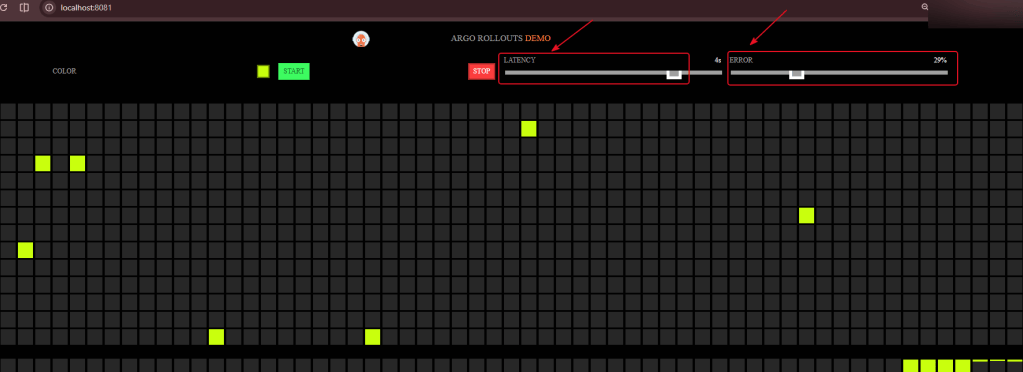
- Watch the magic after you refresh repeatedly – cuz during the canary you SHOULD see requests reach blue & yellow versions. SHOULD…
======================================kubectl get services \ -n rollouts-demo======================================kubectl port-forward \ -n rollouts-demo \ service/rollouts-demo \ 8081:80======================================
Phase 4: Controlled Rollback Test
Broken Canary:
- Put in an incorrect image name, ON PURPOSE!!
apps/rollouts-demo/rollout.yaml
====================================== spec: securityContext: runAsNonRoot: true containers: - name: rollouts-demo image: argoproj/rollouts-demo:does-not-exist imagePullPolicy: IfNotPresent======================================
Observe Failure Containment:
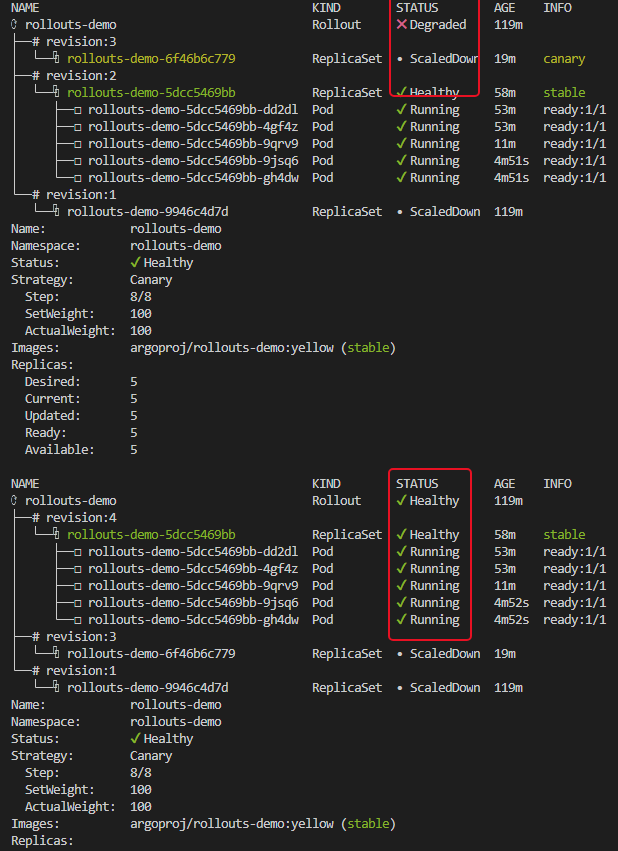
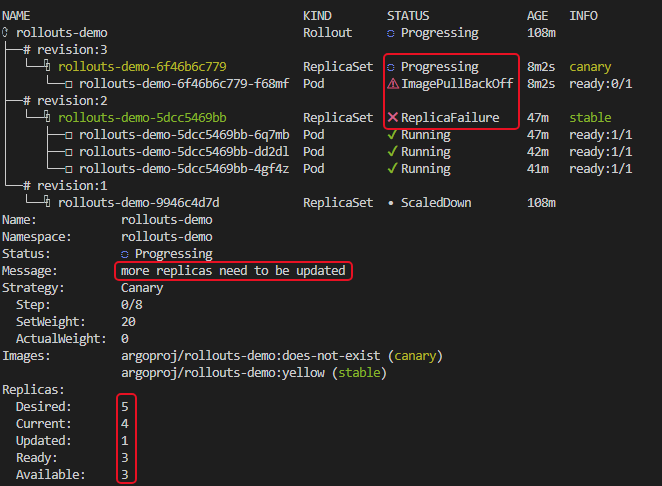
- Watch the rollout & see a new canary pod say “ImagePullBackOff” & never reaches 100%, but traffic still uses yellow.

======================================kubectl argo rollouts get rollout rollouts-demo \ -n rollouts-demo \ --watch======================================kubectl get pods \ -n rollouts-demo \ --watch======================================kubectl describe pod \ -n rollouts-demo \ "$(kubectl get pods \ -n rollouts-demo \ --field-selector=status.phase=Pending \ -o jsonpath='{.items[0].metadata.name}')"
Abort the Canary:
- The failed canary should scale down while yellow remains stable
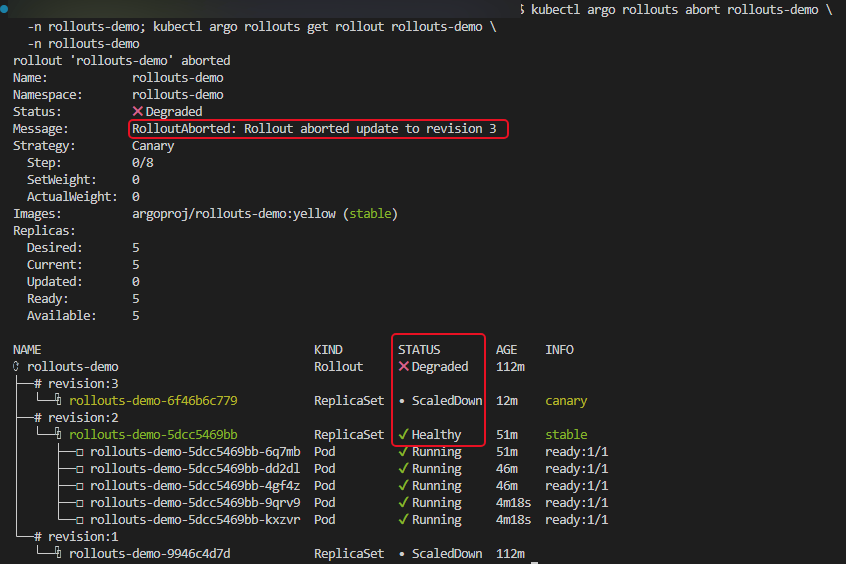
======================================kubectl argo rollouts abort rollouts-demo \ -n rollouts-demo======================================kubectl argo rollouts get rollout rollouts-demo \ -n rollouts-demo======================================
- Scaled down to 3 & then back to 5


Restore git back to the yellow image
- Just a reminder to change it back so you dont have broken stuff
apps/rollouts-demo/rollout.yaml
====================================== spec: securityContext: runAsNonRoot: true containers: - name: rollouts-demo image: argoproj/rollouts-demo:yellow imagePullPolicy: IfNotPresent======================================